


Tilt/Telescoping Steering Column
This feature allows you to tilt the steering column upward or downward. It also allows you to lengthen or shorten the steering column. The tilt/telescoping lever is located below the steering wheel at the end of the steering column.
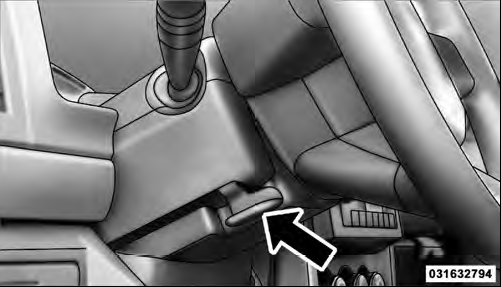
Tilt/Telescoping Lever
To unlock the steering column, pull the lever downward.
To tilt the steering column, move the steering wheel upward or downward as desired. To lengthen or shorten the steering column, pull the steering wheel outward or push it inward as desired. To lock the steering column in position, push the lever upward until fully engaged.
WARNING!
Do not adjust the steering column while driving.
Adjusting the steering column while driving or driving with the steering column unlocked, could cause the driver to lose control of the vehicle. Be sure the steering column is locked before driving your vehicle.
Failure to follow this warning may result in serious injury or death.
See also:
Air Conditioning Control
Press this button to engage the Air
Conditioning. A light will illuminate
when the Air Conditioning system is
engaged. Rotating the dial left into the
blue area of the scale indicates cooler ...
Satellite Radio
To switch to satellite radio mode, say “Sat” or “Satellite
Radio”. In this mode, you may say the following commands:
• “Channel Number” (to change the channel by its
spoken number) ...
Using Operator Mode
Press the switch rearward and hold it, the Sky Slider™
will open from the front and move toward the rear of the
vehicle.
Press the switch forward and hold it, the Sky Slider™
will open from ...