


Instrument Panel Features
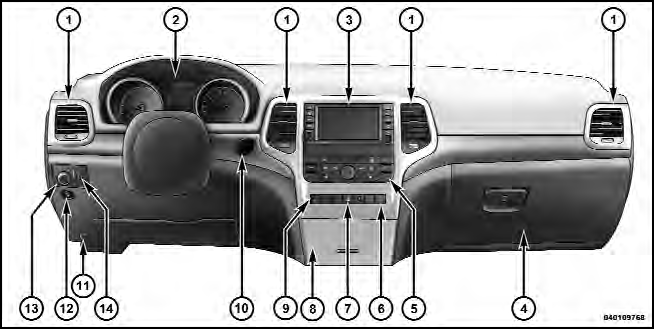
1 — Air Outlet
2 — Instrument Cluster
3 — Radio
4 — Glove Compartment
5 — Climate Controls
6 — Lower Switch Bank
7 — Hazard Switch
8 — Storage Bin
9 — ESC Button
10 — Ignition Switch
11 — Hood Release
12 — Fuel Door Release
13 — Headlight Switch
14 — Dimmer Control
See also:
To Lock The Doors And Liftgate
Press and release the LOCK button on the RKE transmitter
to lock all doors and the liftgate. The turn signal lights
will flash and the horn will chirp to acknowledge the lock
signal. ...
Center High-Mounted Stop Lamp (CHMSL)
The center high-mounted stop lamp is an LED assembly.
See your authorized dealer for replacement.
Center High-Mounted Stop Lamp ...
In The 50 United States And Washington, D.C.
If you believe that your vehicle has a defect that could cause a crash or cause
injury or death, you should immediately inform the National Highway Traffic Safety
Administration (NHTSA) in additio ...