


Media Center 230 (REQ) — AM/FM Stereo Radio And 6–Disc CD/DVD Changer (MP3/WMA AUX Jack)
Jeep Wrangler / Jeep Wrangler Owner's Manual / Understanding Your Instrument Panel / Media Center 230 (REQ) — AM/FM Stereo Radio And 6–Disc CD/DVD Changer (MP3/WMA
AUX Jack)
NOTE: The radio sales code is located on the lower right side of the radio faceplate.
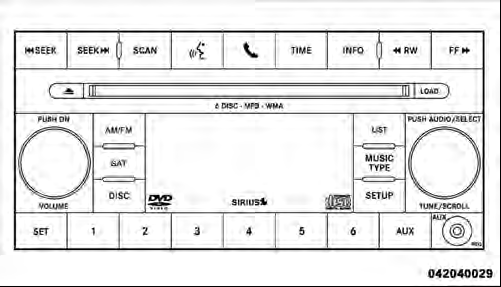
Media Center 230 (REQ)
See also:
Voice Command Tree
Refer to “Voice Tree” in this section. ...
Maintenance-Free Battery
Your vehicle is equipped with a maintenance-free battery.
You will never have to add water, nor is periodic maintenance required.
WARNING!
• Battery fluid is a corrosive acid solution and can bur ...
Electronic Vehicle Information Center (EVIC) Display Messages
When the appropriate conditions exist, a message will
appear in the EVIC display. Refer to “Electronic Vehicle
Information Center (EVIC)” in “Understanding Your
Instrument Panel” for fur ...