


MUSIC TYPE Button
Pressing this button once will turn on the Music Type mode for five seconds. Pressing the MUSIC TYPE button or turning the TUNE/SCROLL control knob within five seconds will allow the program format type to be selected.
Many radio stations do not currently broadcast Music Type information.
Toggle the MUSIC TYPE button to select the following format types:
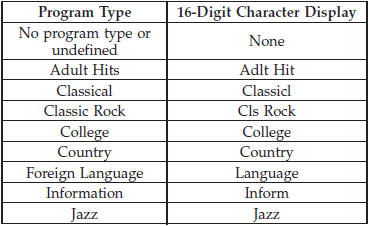
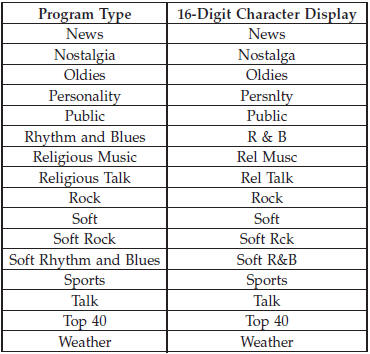
By pressing the SEEK button when the Music Type icon is displayed, the radio will be tuned to the next frequency station with the same selected Music Type name. The Music Type function only operates when in the FM mode.
If a preset button is activated while in the Music Type (Program Type) mode, the Music Type mode will be exited and the radio will tune to the preset station.
See also:
Trip Info
Press and release the UP or DOWN button until “Trip
Info” displays highlighted in the EVIC and press the
SELECT button. Press and release the UP/DOWN buttons
until one of the following Trip ...
Answer or Reject an Incoming Call - No Call Currently in Progress
When you receive a call on your mobile phone, the Uconnect™ Phone will interrupt
the vehicle audio system, if on, and will ask if you would like to answer the call.
Press the button to accept t ...
Transporting Pets
Air Bags deploying in the front seat could harm your pet.
An unrestrained pet will be thrown about and possibly injured, or injure a passenger
during panic braking or in an accident.
Pets should b ...