


Headlight Switch
The headlight switch is located on the left side of the instrument panel, next to the steering wheel. The headlight switch controls the operation of the headlights, parking lights, instrument panel lights, cargo lights and fog lights (if equipped).
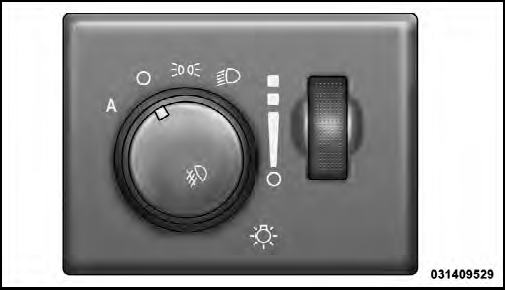
Headlight Switch

To turn on the headlights, rotate the headlight switch clockwise. When the headlight switch is on the parking lights, taillights, license plate light and instrument panel lights are also turned on. To turn off the headlights, rotate the headlight switch back to the O (Off) position.
NOTE:
• Your vehicle is equipped with plastic headlight and
fog light (if equipped) lenses that are lighter and less
susceptible to stone breakage than glass lights. Plastic
is not as scratch resistant as glass and therefore different
lens cleaning procedures must be followed.
• To minimize the possibility of scratching the lenses and reducing light output, avoid wiping with a dry cloth. To remove road dirt, wash with a mild soap solution followed by rinsing.
CAUTION!
Do not use abrasive cleaning components, solvents,
steel wool or other abrasive materials to clean the
lenses.
See also:
Four-Wheel Drive Models
The manufacturer recommends towing with all wheels
OFF the ground. Acceptable methods are to tow the
vehicle on a flatbed or with one end of vehicle raised and
the opposite end on a towing dolly ...
Adding Fluid
Fluid should be added only to fill hole until fluid begins
to run out of the hole. ...
Power Windows
The power window controls are located on the driver’s
door trim panel. There is a single switch on the front
passenger door and rear doors which operate the front
passenger and rear passenger ...