


Tilt/Telescoping Steering Column
This feature allows you to tilt the steering column upward or downward. It also allows you to lengthen or shorten the steering column. The tilt/telescoping lever is located below the steering wheel at the end of the steering column.
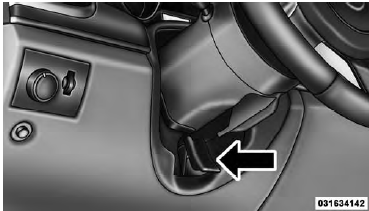
Tilt/Telescoping Lever
To unlock the steering column, push the lever downward (toward the floor). To tilt the steering column, move the steering wheel upward or downward as desired. To lengthen or shorten the steering column, pull the steering wheel outward or push it inward as desired. To lock the steering column in position, push the lever upward until fully engaged.
WARNING!
Do not adjust the steering column while driving.
Adjusting the steering column while driving or driving with the steering column unlocked, could cause the driver to lose control of the vehicle. Be sure the steering column is locked before driving your vehicle.
Failure to follow this warning may result in serious injury or death.
See also:
Emergency Fuel Filler Door Release
If you are unable to open the fuel filler door, use the fuel
filler door emergency release.
1. Open the liftgate.
2. Push down on the inboard edge of the left storage bin,
this will pop up the o ...
Lights
Have someone observe the operation of exterior lights while you work the controls.
Check turn signal and high beam indicator lights on the instrument panel. ...
How To Disengage The Automatic Locking Mode
Unbuckle the combination lap/shoulder belt and allow it to retract completely
to disengage the Automatic Locking Mode and activate the vehicle sensitive (emergency)
locking mode.
WARNING!
• Th ...