


Parksense Warning Display
The ParkSense Warning screen will only be displayed if Sound and Display is selected from the Customer- Programmable Features section of the Electronic Vehicle Information Center (EVIC). Refer to “Electronic Vehicle Information Center (EVIC)/Personal Settings (Customer- Programmable Features)” in “Understanding Your Instrument Panel” for further information.
The ParkSense Warning Display is located in the Instrument cluster’s EVIC display. It provides both visual and audible warnings to indicate the distance between the rear fascia/bumper and the detected obstacle.
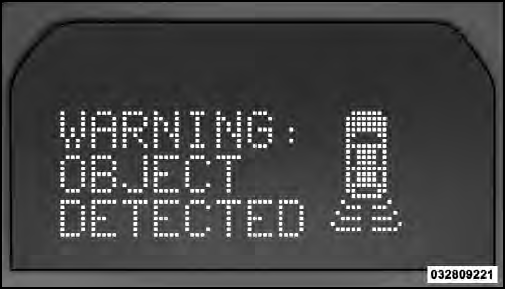
ParkSense Warning Display
See also:
Conference Call
When two calls are in progress (one active and one on
hold), press and hold the button
until you hear a
double beep indicating that the two calls have been
joined into one conference call. ...
Uconnect™ Multimedia (Satellite Radio) — If Equipped
Satellite radio uses direct satellite-to-receiver broadcasting technology to
provide clear digital sound, coast to coast. The subscription service provider is
Sirius Satellite Radio. This service ...
Children Too Large For Booster Seats
Children who are large enough to wear the shoulder belt
comfortably, and whose legs are long enough to bend
over the front of the seat when their back is against the
seat back, should use the la ...