


Tire Psi
Press and release the UP or DOWN button until “Tire
PSI” displays highlighted in the EVIC and press the
SELECT button. Press and release the UP/DOWN buttons
until one of the following System Status messages
displays in the EVIC:
• System OK
• System Warnings Displayed (will display all currently
active System Warnings)
• Tire Pressure Monitor System (shows the current pressure
of all four road tires). For additional information,
refer to “Tire Pressure Monitor System” in “Starting
And Operating”.
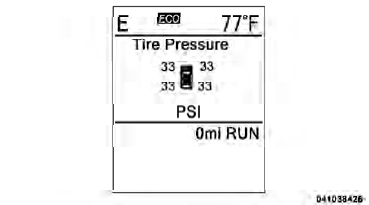
Tire Pressure Display
NOTE:
• Tires heat up during normal driving conditions. Heat
will cause the tire pressure to increase from 2 to 6 psi
(14 to 41 kPa) during normal driving conditions. Refer
to “Tires-General Information/Tire Inflation Pressures”
in “Starting And Operating” for additional
information.
• Your system can be set to display pressure units in PSI, kPa, or BAR.
See also:
Compass Display / ECO (Fuel Saver Mode) — If Equipped
The compass readings indicate the direction
the vehicle is facing. Press and release the
COMPASS button to display one of eight
compass headings, the outside temperature,
and audio informati ...
Engine Break-In Recommendations
A long break-in period is not required for the engine and
drivetrain (transmission and axle) in your vehicle.
Drive moderately during the first 300 miles (500 km).
After the initial 60 miles (100 ...
Windshield Wiper Blades
Clean the rubber edges of the wiper blades and the
windshield periodically with a sponge or soft cloth and a
mild non-abrasive cleaner or use the washer solvent. This
will remove accumulations o ...