


Connecting The iPod Or External USB Device
Use the connection cable to connect an iPod or external USB device to the vehicle’s USB/AUX connector port which is located in the center console or glove compartment.
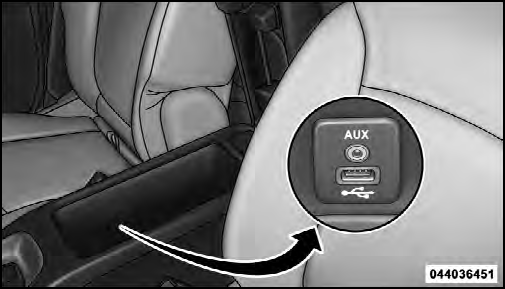
Center Console USB/AUX Connector Port
Once the audio device is connected and synchronized to the vehicle’s iPod /USB/MP3 control system (iPod or external USB device may take a few minutes to connect), the audio device starts charging and is ready for use by pressing radio switches, as described below.
NOTE: If the audio device battery is completely discharged, it may not communicate with the iPod /USB/ MP3 control system until a minimum charge is attained.
Leaving the audio device connected to the iPod /USB/ MP3 control system may charge it to the required level.
See also:
Using Automatic Mode
Press and release the button in the center of the switch
and the Sky Slider™ will close automatically from any
position. ...
Operation Instructions - Auxiliary Mode
The auxiliary (AUX) jack is an audio input jack, which
allows the user to plug in a portable device, such as an
MP3 player, or cassette player, and utilize the vehicle’s
audio system to amplif ...
Fluid Level Check
Check the fluid level by removing the fill plug. The fluid level should be between
the bottom of the fill hole and a point not more than 3/16 in (4.76 mm) below the
bottom of the hole.
Add fluid, ...