


Using The Remote Control
1. Press the MODE button on the Remote Control.
2. While looking at Screen 1, highlight DISC by either pressing Up/Down/Left/Right buttons or by repeatedly pressing the MODE button, then press ENTER.
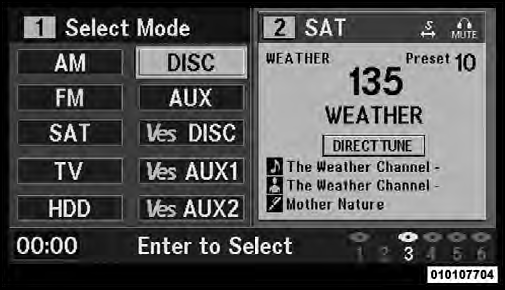
Select DISC Mode On The VES Screen
NOTE:
• Channel/Screen 1 select mode information is shown
on the left side of the screen.
• Channel/Screen 2 select mode information is shown on the right side of the screen.
See also:
In Canada
If you believe that your vehicle has a safety defect, you should contact the
Customer Service Department immediately.
Canadian customers who wish to report a safety defect to the Canadian governmen ...
Synthetic Engine Oils
You may use synthetic engine oils if the recommended oil
quality requirements are met, and the recommended
maintenance intervals for oil and filter changes are
followed. ...
Adding Fluid
Fluid should be added only to fill hole until fluid begins
to run out of the hole. ...