


Other Language Setup
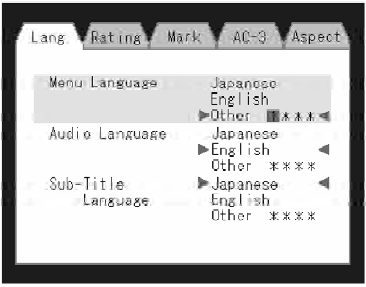
DVD Player Language Menu
All of the Language settings have a special Other setting to accommodate languages other than Japanese or English.
These languages are selected using a special fourdigit code.
To enter a new language code, activate the DVD Setup Menu and follow these additional instructions:
• Using the remote control Up and Down cursor buttons, highlight the Language item you want to edit, and then press the remote control ENTER button.
• Using the remote control Down cursor button, select the Other setting, then press the remote control’s Right cursor button to begin editing the setting.
• Using the remote control Up and Down cursor buttons, select a digit for the current position. After selecting the digit, press the remote control’s Right cursor button to select the next digit. Repeat this digit selection sequence for all four digits.
• When the entire four-digit code is entered, press the remote control’s ENTER button. If the language code is not valid, the numbers all change back to * . If the digits are visible after this step, then the language code is valid.
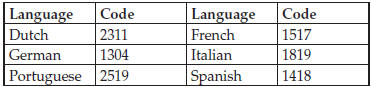
Here is an abbreviated list of language codes. For more language codes, please contact the dealer where the vehicle was purchased.
See also:
Driving Across An Incline
If at all possible, avoid driving across an incline. If it is necessary, know
your vehicle’s abilities. Driving across an incline places more weight on the downhill
wheels, which increases the p ...
Garage Door Opener — If Equipped
HomeLink replaces up to three hand-held transmitters
that operate devices such as garage door openers, motorized
gates, lighting or home security systems. The
HomeLink unit is powered by your ve ...
Manual Seat Height Adjustment — If Equipped
The driver’s seat height can be raised or lowered by using the ratcheting handle,
located on the outboard side of the seat. Pull upward on the handle to raise the
seat; push downward on the hand ...