


Rating and Password Setup
The Rating and Password settings work together to control the types of DVDs that your family watches. Most DVD-Video discs have a rating (from 1 to 8) assigned to them where lower numbers are designated for all audiences and higher numbers are designated for more adult audiences.
When a DVD-Video disc is loaded, its rating is compared to the setting in the DVD player. If the rating of the disc is higher than the setting in the player, a Password screen is displayed. In order to watch the disc, the rear passenger must enter the correct password using the password entry method described below.
To play all discs without requiring a password, set the DVD player’s rating to Level 8. Setting the rating to Level 1 always requires the password to play any DVD disc.
Not all DVD discs encode a Rating, so it is still possible that discs designed for adult audiences can still play without requiring a password.
The default rating is Level 8 (play all discs without a password) and the default password is 0000.
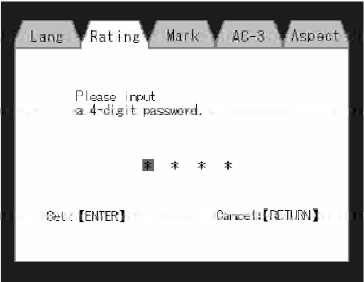
DVD Password Entry
To set the password, activate the DVD Setup Menu and follow these additional instructions:
• Using the remote control Left and Right cursor buttons, select the Rating tab.
• Highlight Change Password , and then press the remote control’s ENTER button.
• Enter the current password. Select a digit, use the remote control Up and Down cursor buttons to set the value for the current digit, and then press the remote control’s Right cursor button to select the next digit.
Repeat this digit selection sequence for all four digits.
• After the four-digit password is entered, press the remote control’s ENTER button. If the password is correct, the set password screen is displayed.
• Using the remote control’s Up and Down cursor buttons to set the value for the current digit and the remote control’s Right cursor button to select digits, enter the new password.
• After the four-digit password is entered, press the remote control’s ENTER button to accept the change.
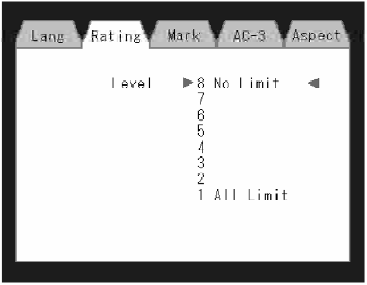
DVD Player Level Menu
To set the rating, activate the DVD Setup Menu and follow these additional instructions:
• Using the remote control’s Left and Right cursor buttons, select the Rating tab.
• Highlight Change Rating , and then press the remote control’s ENTER button.
• Enter the current password. Select a digit, use the remote control’s Up and Down cursor buttons to set the value for the current digit, and then press the remote control’s Right cursor button to select the next digit. Repeat this digit selection sequence for all four digits.
• After the four-digit password is entered, press the remote control’s ENTER button. If the password is correct, the Rating Level menu is displayed.
• Using the remote control’s Up and Down cursor buttons, select the new rating level, and then press the remote control’s ENTER button to accept the change.
See also:
Front Seat — Manual Recline
To recline the seatback, lean forward slightly and lift the
lever. Then lean back to the position desired and release
the lever. To return the seatback to its normal upright
position, lean forwa ...
Parksense Display
When the vehicle is in REVERSE, the warning display
will turn ON indicating the system status.
Park Assist System ON
Park Assist System OFF
The system will indicate a detected obstacle by sho ...
Elapsed Time
Shows the total elapsed time of travel since the last reset.
Elapsed time will increment when the ignition switch is
in the RUN or START position.
Elapsed time is displayed as follows:
hours:min ...