


Entering From The Side
Vehicles that move into your adjacent lanes from either side of the vehicle.
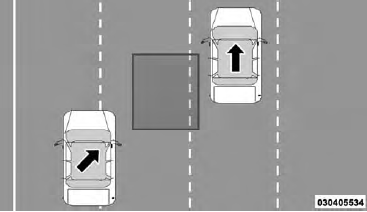
Side Monitoring
See also:
Front/Rear Axle Fluid
For normal service, periodic fluid level checks are not
required. When the vehicle is serviced for other reasons
the exterior surfaces of the axle assembly should be
inspected. If gear oil leaka ...
Floor Mat Safety Information
Always use floor mats designed to fit the footwell of your
vehicle. Use only floor mats that leave the pedal area
unobstructed and that are firmly secured so that they
cannot slip out of positio ...
Barge In - Overriding Prompts
The “Voice Command” button can be used when you wish to skip part of a prompt
and issue your voice command immediately. For example, if a prompt is asking “Would
you like to pair a phone, cl ...