


Instrument Panel Features
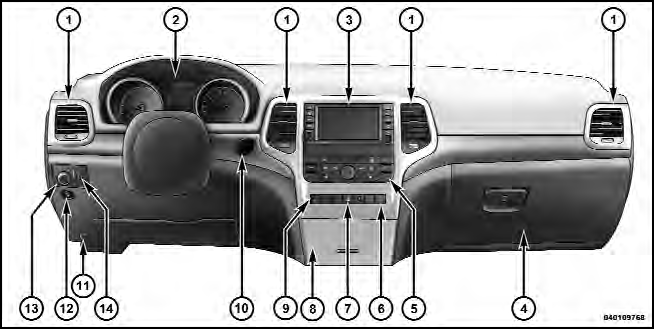
1 — Air Outlet
2 — Instrument Cluster
3 — Radio
4 — Glove Compartment
5 — Climate Controls
6 — Lower Switch Bank
7 — Hazard Switch
8 — Storage Bin
9 — ESC Button
10 — Ignition Switch
11 — Hood Release
12 — Fuel Door Release
13 — Headlight Switch
14 — Dimmer Control
See also:
Jump-Starting Procedure
WARNING!
Failure to follow this procedure could result in personal
injury or property damage due to battery explosion.
CAUTION!
Failure to follow these procedures could result in
damage to th ...
Outside Air Intake
Make sure the air intake, located directly in front of the windshield, is free
of obstructions such as leaves. Leaves collected in the air intake may reduce airflow,
and if they enter the plenum, ...
Trailer Towing
In this section you will find safety tips and information
on limits to the type of towing you can reasonably do
with your vehicle. Before towing a trailer, carefully
review this information to t ...