


Numeric Keypad Menu
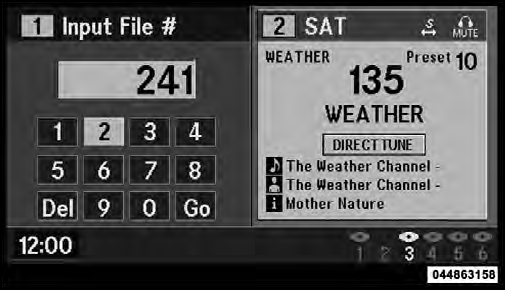
Numeric Keypad Menu
When the display for either Channel 1 or Channel 2
shows DIRECT TUNE, pressing the remote control’s
ENTER button activates a numeric keypad menu. This
screen makes it easy to enter a specific tuner frequency,
satellite channel, or track number. To enter the desired
digit:
1. Press the remote control’s navigation buttons (
 ,
,
 ,
,
 ,
,
 ) to navigate to the desired digit.
2. When the digit is highlighted, press the remote control’s ENTER button to select the digit. Repeat these steps until all digits are entered.
3. To delete the last digit, navigate to the Del button and press the remote control’s ENTER button.
4. After all of the digits are entered, navigate to the Go button and press the remote control’s ENTER button.
See also:
2010 Jeep Patriot review
I get why people love their Jeeps: They're rough and tumble and go anywhere
from a weekend at the beach to an extreme off-roading adventure. However, the
2010 Jeep Patriot feels cheap, sluggish an ...
SET/RND Button (Random Play Button)
Press this button while the CD is playing to activate Random Play. This feature
plays the selections on the compact disc in random order to provide an interesting
change of pace.
Press the right ...
List Paired Mobile Phone Names
• Press the button to
begin.
• After the “Ready” prompt and the following beep, say
“Setup Phone Pairing”.
• When prompted, say “List Phones”.
• The Uconnect™ Phone will ...