


Shifting Procedures
4WD HI To 4WD LOW
With the vehicle at speeds of 0 to 3 mph (0 to 5 km/h), the ignition switch in the ON position or the engine running, shift the transmission into NEUTRAL, and press the “4WD LOW” button once on the transfer case switch. The “4WD LOW” indicator light in the instrument cluster will begin to flash and remain on solid when the shift is complete.
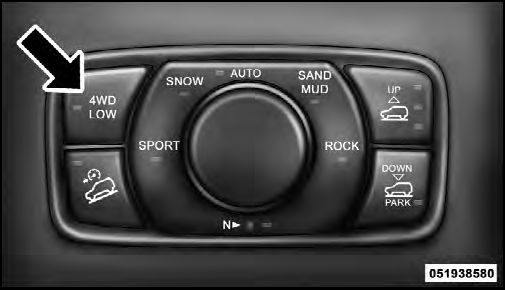
Transfer Case Switch
NOTE: If shift conditions/interlocks are not met, or a transfer case motor temperature protection condition exists, a “For 4x4 Low Slow Below 3 MPH or 5 KPH Put Trans in N Press 4 Low” message will flash from the Electronic Vehicle Information Center (EVIC). Refer to “Electronic Vehicle Information Center (EVIC)” in “Understanding Your Instrument Panel” for further information.
4WD LOW To 4WD HI
With the vehicle at speeds of 0 to 3 mph (0 to 5 km/h), the ignition switch in the ON position or the engine running, shift the transmission into NEUTRAL, and press the “4WD LOW” button once on the transfer case switch. The “4WD LOW” indicator light in the instrument cluster will flash and go out when the shift is complete.
NOTE:
• If shift conditions/interlocks are not met, or a transfer
case motor temperature protection condition exists, a
“For 4x4 High Slow Below 3 MPH or 5 KPH Put Trans
in N Press 4 Low” message will flash from the
Electronic Vehicle Information Center (EVIC). Refer to
“Electronic Vehicle Information Center (EVIC)” in
“Understanding Your Instrument Panel” for further
information.
• Shifting into or out of 4WD LOW is possible with the vehicle completely stopped; however, difficulty may occur due to the mating clutch teeth not being properly aligned. Several attempts may be required for clutch teeth alignment and shift completion to occur.
The preferred method is with the vehicle rolling 0 to 3 mph (0 to 5 km/h). If the vehicle is moving faster than 3 mph (5 km/h), the transfer case will not allow the shift.
NEUTRAL Shift Procedure
1. Turn the ignition switch to the ON position, engine off.
2. Vehicle stopped, with foot on brake.
3. Place the transmission into NEUTRAL.
4. Hold down the NEUTRAL “pin” switch (with a pen, etc.) for four seconds until the LED light by the switch starts to blink indicating shift in progress. The light will stop blinking (stay on solid) when the NEUTRAL shift is complete.
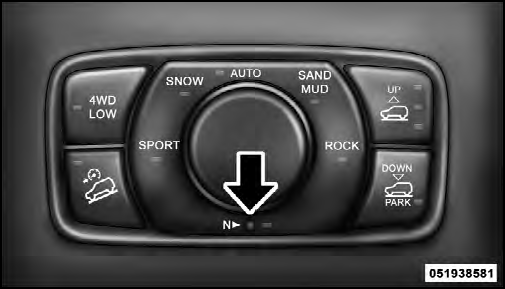
Neutral Switch
5. Repeat Steps 1 to 4 to shift out of NEUTRAL.
NOTE: If shift conditions/interlocks are not met, a “To Tow Vehicle Safely, Read Neutral Shift Procedure in Owners Manual” message will flash from the Electronic Vehicle Information Center (EVIC). Refer to “Electronic Vehicle Information Center (EVIC)” in “Understanding Your Instrument Panel” for further information.
See also:
Emergency Tow Hooks — If Equipped
If your vehicle is equipped with tow hooks, they are mounted in the front and
the rear.
NOTE: For off-road recovery, it is recommended to use both of the front tow
hooks to minimize the risk of d ...
Design
The new 2011 Jeep Compass has a distinct family resemblance to the all-new,
premium 2011 Jeep Grand Cherokee.
With a new hood, new front fenders, new fascia and new headlamps as well as a
new gr ...
System Activation
Sirius Satellite Radio service is pre-activated, and you
may begin listening immediately to the one year of audio
service that is included with the factory-installed satellite
radio system in yo ...