


Tire Markings
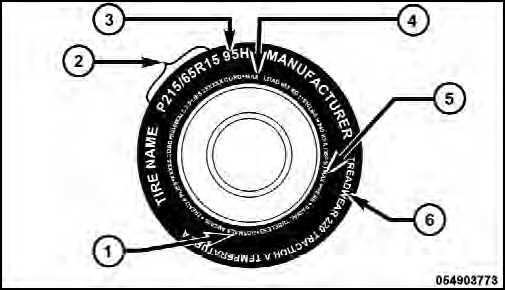
1 — U.S. DOT Safety Standards Code (TIN)
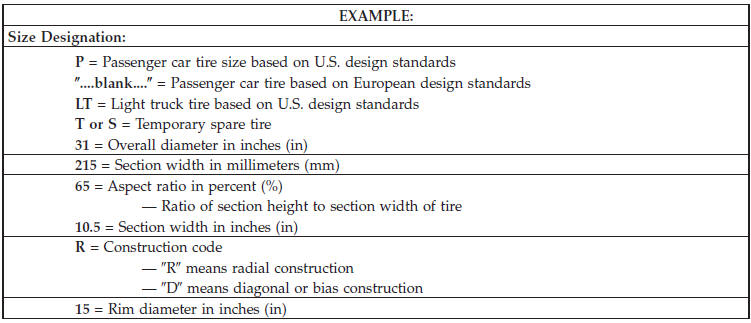
2 — Size Designation
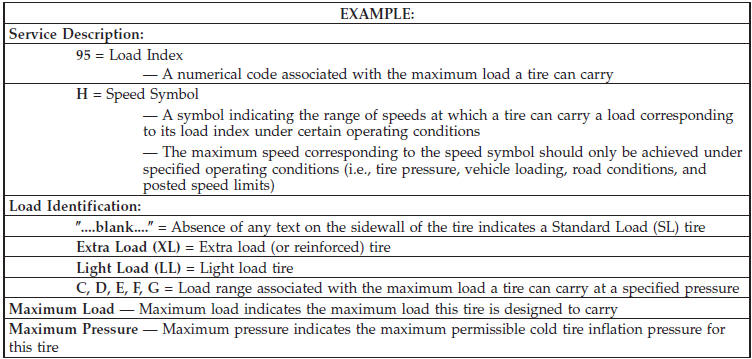
3 — Service Description
4 — Maximum Load
5 — Maximum Pressure
6 — Treadwear, Traction and Temperature Grades
NOTE:
• P (Passenger) - Metric tire sizing is based on U.S.
design standards. P-Metric tires have the letter “P” molded into the sidewall preceding the size designation.
Example: P215/65R15 95H.
• European-Metric tire sizing is based on European design standards. Tires designed to this standard have the tire size molded into the sidewall beginning with the section width. The letter P is absent from this tire size designation. Example: 215/65R15 96H.
• LT (Light Truck) - Metric tire sizing is based on U.S.
design standards. The size designation for LT-Metric tires is the same as for P-Metric tires except for the letters “LT” that are molded into the sidewall preceding the size designation. Example: LT235/85R16.
• Temporary spare tires are spares designed for temporary emergency use only. Temporary high pressure compact spare tires have the letter “T” or “S” molded into the sidewall preceding the size designation. Example: T145/80D18 103M.
• High flotation tire sizing is based on U.S. design standards and it begins with the tire diameter molded into the sidewall. Example: 31x10.5 R15 LT.
Tire Sizing Chart
See also:
Supplemental Seat-Mounted Side Air Bag (SAB) Inflator Units
The Supplemental Seat-Mounted Side Air Bags are designed
to activate only in certain side collisions.
The ORC determines if a side collision requires the side
air bags to inflate, based on the se ...
Replacing The Batteries
The remote control requires two AAA batteries for operation.
To replace the batteries:
• Locate the battery compartment on the back of the
remote, then slide the battery cover downward.
• Rep ...
SET/RND Button — To Set the Pushbutton Memory
When you are receiving a station that you wish to commit to pushbutton memory,
press the SET/RND button. The symbol SET 1 will now show in the display window.
Select the button (1–6) you wish to ...