


Fuel Filler Cap (Gas Cap)
The gas cap is located behind the locking fuel filler door, on the driver’s side of the vehicle. If the gas cap is lost or damaged, be sure the replacement cap is for use with this vehicle.
1. Press the fuel filler door release switch (located under the headlamp switch).
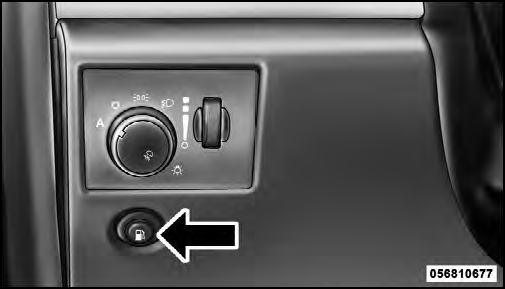 Fuel Filler Door Release Switch
2. Open the fuel filler door, and remove the fuel filler cap.
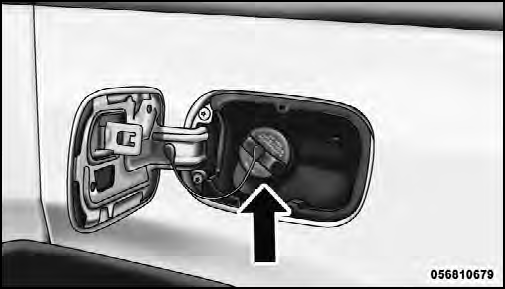
Fuel Filler Cap
CAUTION!
• Damage to the fuel system or emission control
system could result from using an improper fuel
cap (gas cap). A poorly fitting cap could let impurities
into the fuel system. Also, a poorly fitting
aftermarket cap can cause the “Malfunction Indicator
Light (MIL)” to illuminate, due to fuel vapors
escaping from the system.
• A poorly fitting gas cap may cause the MIL to turn on.
• To avoid fuel spillage and overfilling, do not “top off” the fuel tank after filling.
WARNING!
• Never have any smoking materials lit in or near
the vehicle when the gas cap is removed or the
tank is being filled.
• Never add fuel when the engine is running. This is in violation of most state and federal fire regulations and may cause the malfunction indicator light to turn on.
• A fire may result if gasoline is pumped into a portable container that is inside of a vehicle. You could be burned. Always place gas containers on the ground while filling.
NOTE:
• When the fuel nozzle “clicks” or shuts off, the fuel
tank is full.
• Tighten the gas cap about one-quarter turn until you hear one click. This is an indication that the cap is properly tightened.
• If the gas cap is not tighten properly, the MIL will come on. Be sure the gas cap is tightened every time the vehicle is refueled.
See also:
Media Center 130 With Satellite Radio (Sales Code RES+RSC)
NOTE: The radio sales code is located on the lower right
side of the radio faceplate.
Media Center 130 (RES/RSC) ...
Lap/Shoulder Belt Operating Instructions
1. Enter the vehicle and close the door. Sit back and adjust the seat.
2. The seat belt latch plate is above the back of the front seat and next to
your arm in the rear seat. Grasp the latch plate ...
Compass Variance
Refer to “Compass Display” for more information. ...