


Window Lockout Button
The window lockout button on the driver’s door trim panel allows you to disable the window control on the rear doors. To disable the window control on the other doors, press and release the window LOCKOUT button (setting it in the down position). To enable the window controls, press and release the window LOCKOUT button again (setting it in the up position).
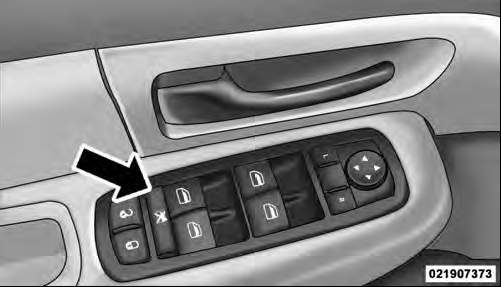
Window Lockout Button
See also:
Trailer Towing
In this section, you will find safety tips and information
on limits to the type of towing you can reasonably do
with your vehicle. Before towing a trailer, carefully
review this information to ...
Adding Engine Coolant
Your vehicle has been built with an improved engine coolant (antifreeze) that
allows extended maintenance intervals. This engine coolant (antifreeze) can be used
up to five years or 104,000 miles ...
Remote Unlock Sequence
This feature lets you program the system to unlock either
the driver’s door or all doors, on the first press of the
UNLOCK button on the RKE transmitter. To change the
current setting, refer t ...