


Driver Memory Seat — If Equipped
This feature allows the driver to store up to two different memory profiles, for easy recall through a memory switch. Each memory profile contains desired position settings for the driver seat and side mirrors and a set of desired radio station presets.
The memory switch is located on the instrument panel to the left of the steering column. The switch contains a S (SET) button to activate the memory save function. It also contains a rocker switch labeled with the number (1) and the number (2). The rocker switch allows the driver to recall either of the two pre-programmed memory profiles by pressing the appropriate side of the switch.
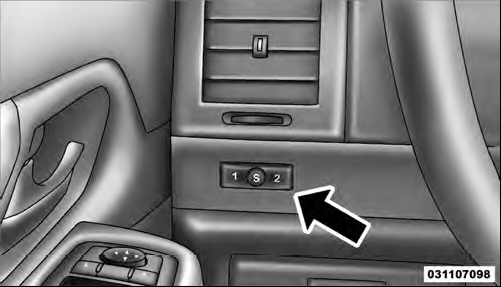
Driver Memory Switch
See also:
Heated Seats — If Equipped
On some models, the front driver and passenger seats may be equipped with heaters
in both the seat cushions and seatbacks.
There are two heated seat switches that allow the driver and passenger to ...
Chrysler Group LLC Customer Center
P.O. Box 21–8004
Auburn Hills, MI 48321–8004
Phone: (877) 426–5337 ...
Clock Setting Procedure
1. Press and hold the TIME button until the hours blink.
2. Adjust the hours by turning the right side TUNE/ SCROLL control knob.
3. After adjusting the hours, press the right side TUNE/ SCROLL cont ...