


Automatic Headlights — If Equipped
This system automatically turns the headlights on or off according to ambient light levels. To turn the system on, turn the end of the multifunction lever to the AUTO position (third detent). When the system is on, the Headlight Time Delay feature is also on. This means the headlights will stay on for up to 90 seconds after you turn the ignition switch to the LOCK position. To turn the Automatic System off, turn the end of the multifunction lever out of the AUTO position.
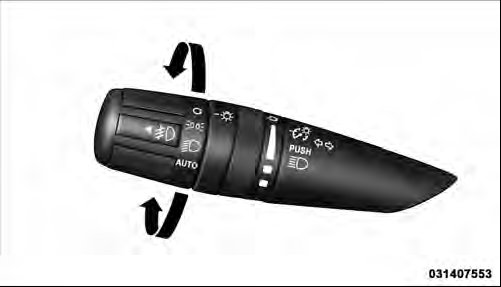
Headlight Switch
NOTE: The engine must be running before the headlights will turn on in the Automatic mode.
See also:
Jacking Instructions
WARNING!
Carefully follow these tire changing warnings to
help prevent personal injury or damage to your
vehicle:
• Always park on a firm, level surface as far from
the edge of the roadway ...
Center Console
The center console contains both an upper and a lower
storage area.
Storage Compartment
To open the upper storage compartment, pull upward on
the small latch located on the lid.
Storage Com ...
Inflation Pressure
This is the cold tire inflation pressure for your vehicle for all loading conditions
up to full GAWR. ...