


Instrument Panel Dimmer
Rotate the center portion of the lever to the extreme bottom position to fully dim the instrument panel lights and prevent the interior lights from illuminating when a door is opened.
Rotate the center portion of the lever up to increase the brightness of the instrument panel lights when the parking lights or headlights are on.
Rotate the center portion of the lever upward to the next detent position to brighten the odometer and radio when the parking lights or headlights are on.
Rotate the center portion of the lever upward to the last detent to turn on the interior lighting.
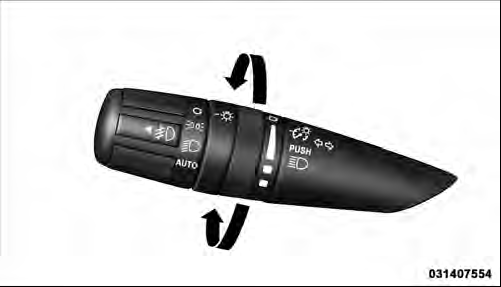
Dimmer Control
See also:
Tire Rotation Recommendations
The tires on the front and rear of your vehicle operate at
different loads and perform different steering, handling,
and braking functions. For these reasons, they wear at
unequal rates.
These ...
Media Center 730N/430/430N (RHR/RER/ RBZ/RHB) CD/DVD/HDD/NAV — If Equipped .
.
NOTE: The sales code is located on the lower right side
of the unit’s faceplate.
Refer to your Uconnect™ Multimedia RHR, RER, RBZ or
RHB user’s manual for detailed operating instructions. ...
Frequency Of Fluid Change
Under normal operating conditions, the fluid installed at
the factory will give satisfactory lubrication for the life of
the vehicle. Fluid changes are not necessary unless the
fluid becomes con ...