


Retractable Cargo Area Cover — If Equipped
NOTE: The purpose of this cover is for privacy, not to secure loads. It will not prevent cargo from shifting or protect passengers from loose cargo.
The removable retractable cargo area cover mounts in the cargo area behind the top of the rear seats.
The cover, when extended, covers the cargo area to keep items out of sight. Notches in the trim panels near the liftgate opening secure the extended cover in place.
The cover rolls away neatly inside its housing when not in use. You can also remove the cover from the vehicle to make more room in the cargo area.
To install the cover, position it in the vehicle so that the flat side of the housing faces upward. Then, insert either the left or the right spring-loaded post (located on the ends of the cover housing) into either of the left or the right attachment points shown.
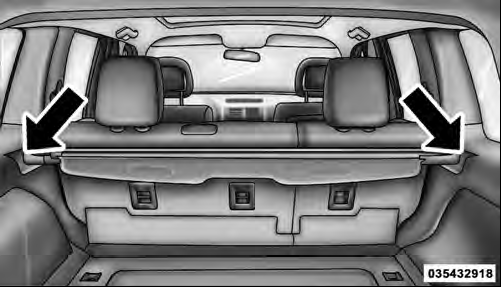
Installing Retractable Cargo Area Cover
Then, insert the spring-loaded post on the opposite end of the cover housing into the attachment point on the opposite side of the vehicle.
Next, grab the cover handle and pull the cover toward you. As the cover nears the liftgate opening, guide the rear attachment posts (on both ends of the cover) into the notches in the trim panels. Then, lower the cover to position the posts into the bottom of the notches and release the handle.
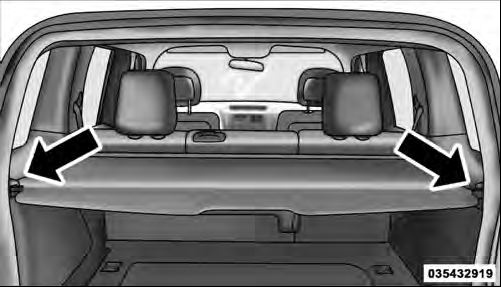
Positioning Retractable Cargo Area Cover
WARNING!
In a collision, a cargo cover loose in the vehicle could
cause injury. It could fly around in a sudden stop and
strike someone in the vehicle. Do not store the cargo
cover on the cargo floor or in the passenger compartment.
Remove the cover from the vehicle when taken from its mounting. Do not store in the vehicle.
See also:
Hazard Warning Flashers
The Hazard Warning flasher switch is located on the instrument panel below the
climate controls.
Press the switch to turn on the Hazard Warning flasher. When the switch is activated,
all direct ...
Voice Training
For users experiencing difficulty with the system recognizing their voice commands
or numbers the Uconnect™ Voice “Voice Training” feature may be used.
1. Press the Voice Command button,
s ...
Other Language Setup
DVD Player Language Menu
All of the Language settings have a special Other setting
to accommodate languages other than Japanese or English.
These languages are selected using a special fourdigit ...