


Supported MP3 File Formats
The radio will recognize only files with the *.MP3 extension as MP3 files. Non-MP3 files named with the *.MP3 extension may cause playback problems. The radio is designed to recognize the file as an invalid MP3 and will not play the file.
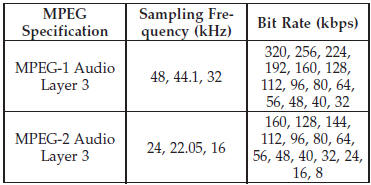
When using the MP3 encoder to compress audio data to an MP3 file, the bit rate and sampling frequencies in the following table are supported. In addition, variable bit rates (VBR) are also supported. The majority of MP3 files use a 44.1 kHz sampling rate and a 192, 160, 128, 96 or VBR bit rate.
ID3 Tag information for artist, song title, and album title are supported for version 1 ID3 tags. ID3 version 2 is not supported by the radios.
Playlist files are not supported. MP3 Pro files are not supported.
See also:
Lane Change Assist
Tap the lever up or down once, without moving beyond the detent, and the turn
signal (right or left) will flash three times then automatically turn off. ...
Engine Oil Viscosity
SAE 5W-20 engine oil is recommended for all operating
temperatures. This engine oil improves low temperature
starting and vehicle fuel economy. The engine oil filler
cap also shows the recommend ...
Electronic Vehicle Information Center (EVIC) — If Equipped
The Electronic Vehicle Information Center (EVIC) features a driver-interactive
display that is located in the instrument cluster.
Electronic Vehicle Information Center (EVIC)
This system conveni ...