


Steering Wheel Audio Controls
The remote sound system controls are located on the rear surface of the steering wheel. Reach behind the wheel to access the switches.
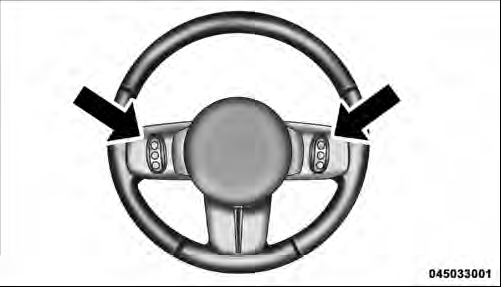
Remote Sound System Controls (Back View Of Steering Wheel)
The right-hand control is a rocker-type switch with a pushbutton in the center and controls the volume and mode of the sound system. Pressing the top of the rocker switch will increase the volume, and pressing the bottom of the rocker switch will decrease the volume.
Pressing the center button will make the radio switch between the various modes available (AM/FM/SAT/ CD/HDD/AUX/VES, etc.).
The left-hand control is a rocker-type switch with a pushbutton in the center. The function of the left-hand control is different depending on which mode you are in.
The following describes the left-hand control operation in each mode.
See also:
Quadra-Drive II System – If Equipped
The optional Quadra-Drive II System features two
torque transfer couplings. The couplings include an
Electronic Limited-Slip Differential (ELSD) rear axle and
the Quadra-Trac II transfer case. T ...
Compressed Audio Files (MP3 and WMA)
The DVD player is capable of playing MP3 (MPEG-1
Audio Layer 3) and WMA (Windows Media Audio) files
from a CD Data disc (usually a CD-R or CD-RW).
• The DVD player always uses the file extensio ...
Important Notes For Single Video Screen System
• VES™ is able to transmit two channels of stereo audio
simultaneously.
• In split screen mode the left side equates to Channel 1
and right side equates to Channel 2.
• If a video source ...