


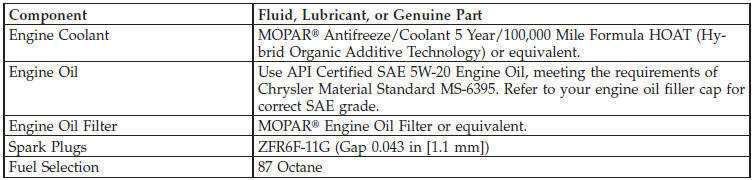
Engine
See also:
Call Termination
To end a call in progress, momentarily press the
button. Only the active call(s) will be terminated and if
there is a call on hold, it will become the new active call.
If the active call is ter ...
Select Another Mobile Phone
This feature allows you to select and start using another
phone paired with the Uconnect™ Phone.
• Press the button to begin.
• After the “Ready” prompt and the following beep, say
†...
Shift Lever Override
If a malfunction occurs and the shift lever cannot be
moved out of the PARK position, you can use the
following procedure to temporarily move the shift lever:
1. Firmly apply the parking brake.
...