


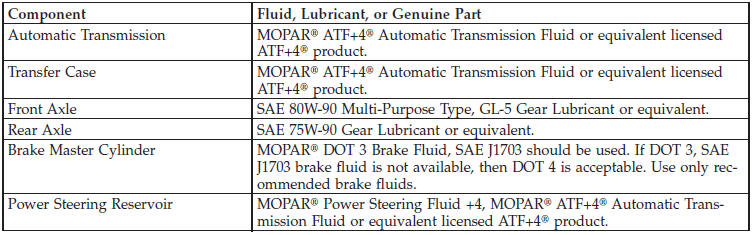
Chassis
See also:
Instrument Cluster Descriptions
1. Fuel Gauge
The pointer shows the level of fuel in the fuel tank when the ignition switch
is in the ON/RUN position.
2. Charging System Light
This light shows the status of the electrical cha ...
Vehicle Security Alarm — If Equipped
The Vehicle Security Alarm monitors the vehicle doors, swing gate, and ignition
for unauthorized operation.
While the Vehicle Security Alarm is armed, interior switches for door locks are
disable ...
Transmission Limp Home Mode
Transmission function is monitored electronically for
abnormal conditions. If a condition is detected that could
result in transmission damage, Transmission Limp Home
Mode is activated. In this ...