


Outside Power Mirrors
The power mirror switch is located on the driver’s side door trim panel.
The power mirror controls consist of mirror select buttons and a four-way mirror control switch. To adjust a mirror, press the mirror select button for the mirror that you want to adjust. Using the mirror control switch, press on any of the four arrows for the direction that you want the mirror to move.
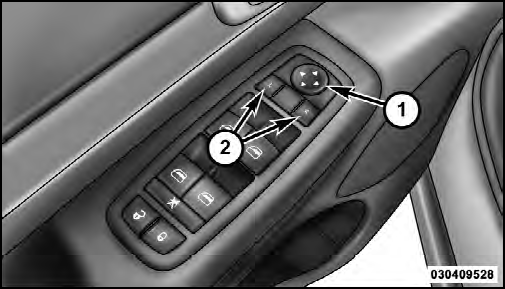
Power Mirror Switch
1 — Mirror Direction Control
2 — Mirror Selection
Power mirror preselected positions can be controlled by the optional Memory Seat Feature. Refer to “Driver Memory Seat” in “Understanding The Features Of Your Vehicle” for further information.
See also:
Manual Compass Calibration
If the compass appears erratic, inaccurate or abnormal, you may wish to calibrate
the compass. Prior to calibrating the compass, make sure the proper zone is selected.
1. Start the engine and leave ...
Front And Side Impact Sensors
In front and side impacts, front and side impact sensors can aid the ORC in determining
the appropriate response to certain impact events. ...
Chassis
...