


Rear Heated Seats
On some models, the two outboard seats are equipped with heated seats. There are two heated seat switches that allow the rear passengers to operate the seats independently.
The heated seat switches for each heater are located on the rear of the center console.
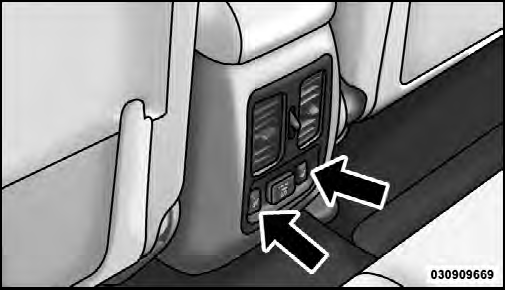
Rear Heated Seat Switches
You can choose from HIGH, LOW or OFF heat settings.
Amber indicator lights in each switch indicate the level of heat in use. Two indicator lights will illuminate for HIGH, one for LOW and none for OFF.

Press the switch once to select HIGH-level heating. Press the switch a second time to select LOW-level heating. Press the switch a third time to shut the heating elements OFF.
NOTE: Once a heat setting is selected, heat will be felt within two to five minutes.
When the HIGH-level setting is selected, the heater will provide a boosted heat level during the first four minutes of operation. Then, the heat output will drop to the normal HIGH-level. If the HIGH-level setting is selected, the system will automatically switch to LOW-level after a maximum of 50 minutes of continuous operation. At that time, the number of illuminated LEDs changes from two to one, indicating the change. The LOW-level setting will turn OFF automatically after a maximum of 45 minutes.
See also:
Freedom Top™ Storage Bag
Vehicles equipped with a Freedom Top™ Modular Hard Top, come with a Freedom Top™
storage bag that allows you to store your Freedom Top™ panels. The storage bag contains
two compartments and ...
Crossing A Ravine, Gully, Ditch, Washout Or Rut
When crossing a ravine, gully, ditch, washout or a large rut, the angled approach
is the key to maintaining your vehicle’s mobility. Approach these obstacles at a
45- degree angle and let each t ...
Call by Saying a Name
• Press the button to begin.
• After the “Ready” prompt and the following beep, say “Call”.
• The system will prompt you to say the name of the person you want to call.
• After the ...