


Fog Lights — If Equipped
The fog lights are turned on by rotating the headlight switch to the parking light or headlight position and pushing in the headlight rotary control.
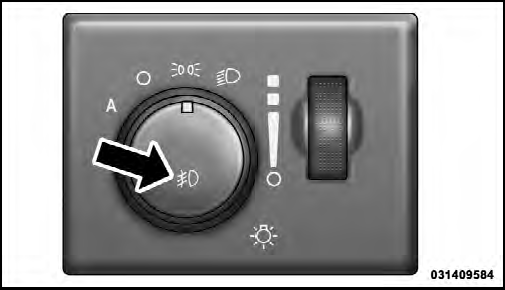
Fog Light Operation
The fog lights will operate only when the parking lights are on or when the vehicle headlights are on low beam.
An indicator light located in the instrument cluster will illuminate when the fog lights are on. The fog lights will turn off when the switch is pushed a second time, when the headlight switch is rotated to the off position, or the high beam is selected.
See also:
Working With Automated Systems
This method is used in instances where one generally has
to press numbers on the mobile phone keypad while
navigating through an automated telephone system.
You can use your Uconnect™ Phone to ...
ESN/SID Access
With the ignition switch in the ON/RUN or ACC position and the radio on, press
the SETUP button and scroll using the TUNE/SCROLL control knob until Sirius ID is
selected. Press the TUNE/SCROLL con ...
SET/RND Button — To Set the Pushbutton Memory
When you are receiving a station that you wish to commit to pushbutton memory,
press the SET/RND button. The symbol SET 1 will now show in the display window.
Select the button (1–6) you wish to ...