


Adaptive Cruise Control (ACC) Operation
The speed control buttons (located on the right side of the steering wheel) operates the ACC system.
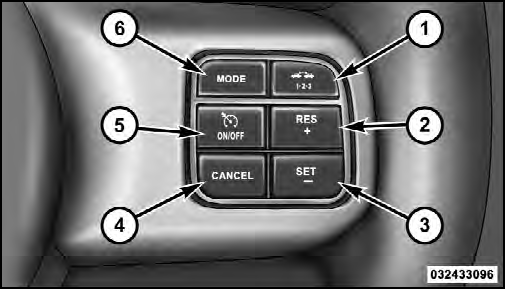
1 — DISTANCE SETTING
2 — RES +
3 — SET -
4 — CANCEL
5 — ON/OFF
6 — MODE
NOTE: Any chassis/suspension modifications to the vehicle will effect the performance of the Adaptive Cruise Control.
See also:
HSA Off
If you wish to turn off the HSA system, it can be done
using the Customer Programmable Features in the Electronic
Vehicle Information Center (EVIC). Refer to “Electronic
Vehicle Information Ce ...
Upper Half Door Window Removal — If Equipped
Grasp the half door window and pull upward.
Upper Half Door Window ...
Troubleshooting Tips
If you are having trouble programming HomeLink , here
are some of the most common solutions:
• Replace the battery in the original hand-held transmitter.
• Press the LEARN button on the Garage ...