


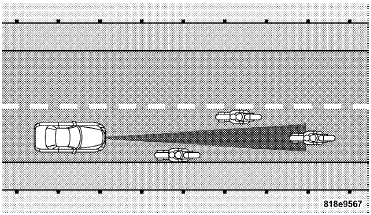
Narrow Vehicles
Some narrow vehicles traveling near the outer edges of the lane or edging into the lane are not detected until they have moved fully into the lane. There will not be sufficient distance to the vehicle ahead.
See also:
Seat Belt Extender
If a seat belt is too short, even when fully extended and
when the adjustable upper shoulder belt anchorage (if
equipped) is in its lowest position, your authorized
dealer can provide you with a ...
SEEK Button
Press the right SEEK button for the next selection on the CD. Press the left
SEEK button to return to the beginning of the current selection, or return to the
beginning of the previous selection i ...
To Set The Variance
Start the engine and leave the transmission gear selector lever in the PARK position.
Press and hold the RESET button on the steering wheel (for approximately ten seconds)
until the current varian ...