


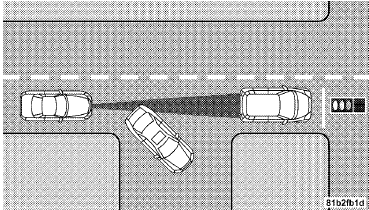
Stationary Objects And Vehicles
ACC does not react to stationary objects and stationary vehicles. For example, ACC will not react in situations where the vehicle you are following exits your lane and the vehicle ahead is stopped in your lane. Always be attentive and ready to apply the brakes if necessary.
See also:
In Canada
If you believe that your vehicle has a safety defect, you
should contact the Customer Service Department immediately.
Canadian customers who wish to report a safety
defect to the Canadian governm ...
Adaptive Cruise Control (ACC) Menu
The EVIC displays the current ACC system settings. The
EVIC is located in the upper part of the instrument
cluster between the speedometer and the tachometer. The
information it displays depends ...
Phone and Network Status Indicators
If available on the radio and/or on a premium display such as the instrument
panel cluster, and supported by your mobile phone, the Uconnect™ Phone will provide
notification to inform you of you ...