


Front Map/Reading Lights
Lights are mounted in the overhead console. Each light can be turned on by pressing the switch on either side of the console. These buttons are backlit for night time visibility.
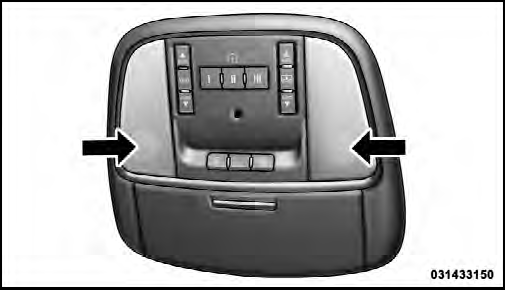
Front Map/Reading Lights
To turn the lights off, press the switch a second time. The lights also turn on when a door is opened. The lights will also turn on when the UNLOCK button on the RKE is pressed.
See also:
Engine Break-In Recommendations
A long break-in period is not required for the engine and
drivetrain (transmission and axle) in your vehicle.
Drive moderately during the first 300 miles (500 km).
After the initial 60 miles (100 ...
Intermittent Wiper System
Use one of the four intermittent wiper settings when
weather conditions make a single wiping cycle, with a
variable delay between cycles, desirable. At driving
speeds above 10 mph (16 km/h), the ...
Recreational Towing – Quadra–Trac II / Quadra–Drive II Four-Wheel Drive Models
.
The transfer case must be shifted into NEUTRAL (N) and
the transmission must be placed in PARK for recreational
towing. The NEUTRAL (N) selection button is adjacent to
the transfer case selector ...