


Instrument Panel Features
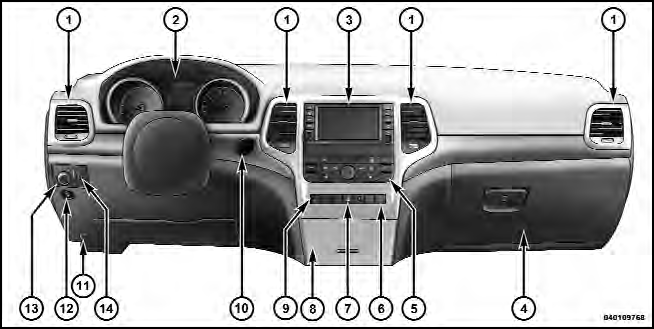
1 — Air Outlet
2 — Instrument Cluster
3 — Radio
4 — Glove Compartment
5 — Climate Controls
6 — Lower Switch Bank
7 — Hazard Switch
8 — Storage Bin
9 — ESC Button
10 — Ignition Switch
11 — Hood Release
12 — Fuel Door Release
13 — Headlight Switch
14 — Dimmer Control
See also:
Points To Remember
NOTE: When the vehicle is stopped after a few miles/ kilometers of operation,
you may observe vapor coming from the front of the engine compartment. This is normally
a result of moisture from rain ...
Shift Positions
The transfer case switch is located on the center console
next to the shift lever.
Transfer Case Switch
2WD
Rear Wheel Drive High Range - This range is used for
normal street and highway driv ...
Change Engine Oil
The oil change indicator system will remind you that it is time to take your
vehicle in for scheduled maintenance.
Refer to “Maintenance Schedule” for further information.
NOTE: Under no circu ...