


Supported MP3 File Formats
The radio will recognize only files with the *.MP3 extension as MP3 files. Non-MP3 files named with the *.MP3 extension may cause playback problems. The radio is designed to recognize the file as an invalid MP3 and will not play the file.
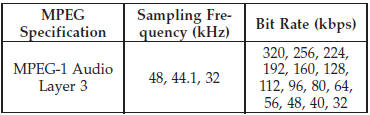
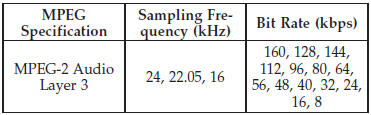
When using the MP3 encoder to compress audio data to an MP3 file, the bit rate and sampling frequencies in the following table are supported. In addition, variable bit rates (VBR) are also supported. The majority of MP3 files use a 44.1 kHz sampling rate and a 192, 160, 128, 96 or VBR bit rate.
ID3 Tag information for artist, song title, and album title are supported for version 1 ID3 tags. ID3 version 2 is not supported by the radios.
Playlist files are not supported. MP3 Pro files are not supported.
See also:
Hazard Warning Flashers
The Hazard Warning flasher switch is located in the
switch bank below the climate controls.
Press the switch to turn on the Hazard Warning
flasher. When the switch is activated, all directional ...
Lap/Shoulder Belts
All seating positions in your vehicle are equipped with
lap/shoulder belts. The belt webbing retractor is designed
to lock during very sudden stops or accidents.
This feature allows the shoulder ...
Engine Oil Viscosity
SAE 5W-20 engine oil is recommended for all operating
temperatures. This engine oil improves low temperature
starting and vehicle fuel economy. The engine oil filler
cap also shows the recommend ...