


How To Use This Manual
Consult the Table of Contents to determine which section contains the information you desire.
Since the specification of your vehicle depends on the items of equipment ordered, certain descriptions and illustrations may differ from your vehicle’s equipment.
The detailed index at the back of this Owner’s Manual contains a complete listing of all subjects.
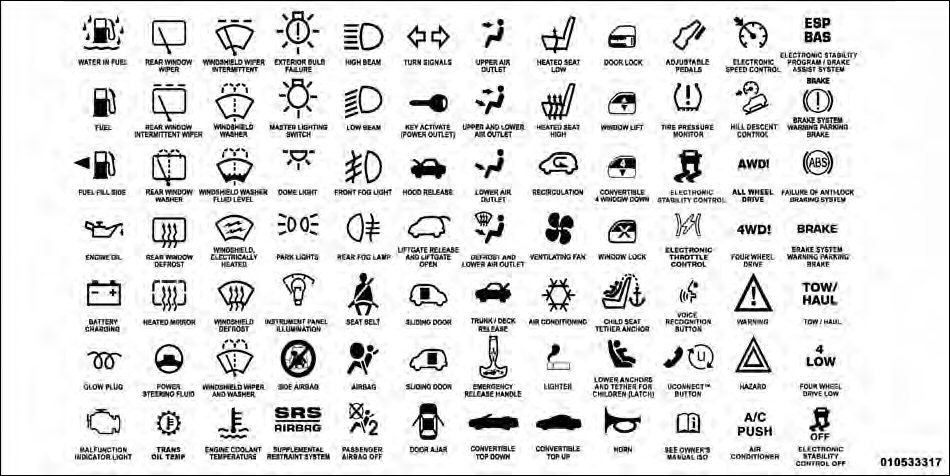
Consult the following table for a description of the symbols that may be used on your vehicle or throughout this Owner’s Manual:
See also:
Vacation Storage
Anytime you store your vehicle, or keep it out of service (i.e., vacation) for
two weeks or more, run the air conditioning system at idle for about five minutes
in the fresh air and high blower se ...
To Lower Rear Seat
Either side of the rear seat can be lowered to allow for
extended cargo space and still maintain some rear seating
room.
NOTE: Be sure that the front seats are fully upright and
positioned forw ...
Electronic Brake Control System
Your vehicle is equipped with an advanced electronic
brake control system that includes the Anti-Lock Brake
System (ABS), Traction Control System (TCS), Brake
Assist System (BAS), Electronic Rol ...