


Ignition Key Removal
1. Place the shift lever in PARK (if equipped with an automatic transmission).
2. Turn the ignition switch to the ACC (ACCESSORY) position.
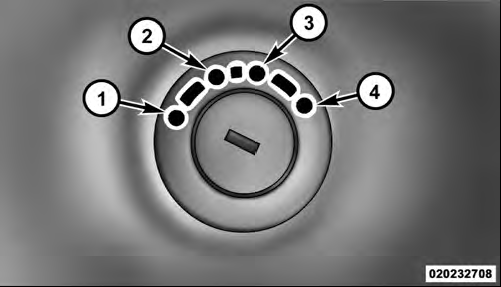
Ignition Switch Positions
1 — LOCK
2 — ACC (ACCESSORY)
3 — ON/RUN
4 — START
3. Push the ignition key inward.
4. Turn the ignition key to the LOCK position, and remove the key.
WARNING!
• Before exiting a vehicle, always apply the parking brake, shift the transmission
into PARK, and remove the key fob from the ignition. When leaving the vehicle, always
lock your vehicle.
• Never leave children alone in a vehicle, or with access to an unlocked vehicle.
• Allowing children to be in a vehicle unattended is dangerous for a number of reasons. A child or others could be seriously or fatally injured. Children should be warned not to touch the parking brake, brake pedal or the shift lever.
• Do not leave the key fob in or near the vehicle, and do not leave the ignition in the ACC or ON/RUN position. A child could operate power windows, other controls, or move the vehicle.
• Do not leave children or animals inside parked vehicles in hot weather. Interior heat build-up may cause serious injury or death.
CAUTION!
An unlocked vehicle is an invitation to thieves.
Always remove the key from the ignition, and lock all doors when leaving the vehicle unattended.
See also:
System Activation
Sirius Satellite Radio service is pre-activated, and you may begin listening
immediately to the one year of audio service that is included with the factory-installed
satellite radio system in your ...
Disposing Of Used Engine Oil And Oil Filters
Care should be taken in disposing of used engine oil and oil filters from your
vehicle. Used oil and oil filters, indiscriminately discarded, can present a problem
to the environment. Contact your ...
Supplemental Active Head Restraints (AHR)
These head restraints are passive, deployable components,
and vehicles with this equipment cannot be readily
identified by any markings, only through visual inspection
of the head restraint. The ...