


Automatic Headlights — If Equipped
This system automatically turns the headlights on or off according to the ambient light levels. To turn the system on, turn the end of the multifunction lever to the AUTO position (third detent). When the system is on, the Headlight Time Delay feature is also on. This means the headlights will stay on for 90 seconds after you turn the ignition switch to the LOCK position. To turn the Automatic System off, turn the end of the multifunction lever out of the AUTO position.
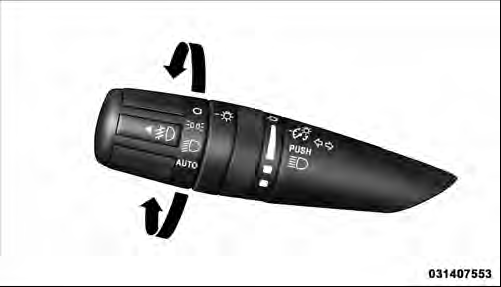
Headlight Switch
NOTE: The engine must be running before the headlights will turn on in the Automatic mode.
See also:
Trip Conditions
Trip Odometer (ODO) / ECO (Fuel Saver Indicator) — If Equipped
This display shows the distance traveled since the last reset. Press and release
the right button (on the instrument cluster) to swi ...
Phone And Network Status Indicators
If available on the radio and/or on a premium display
such as the instrument panel cluster, and supported by
your mobile phone, the Uconnect™ Phone will provide
notification to inform you of y ...
Getting High-Centered
If you get hung up or high-centered on an object, get out of the vehicle and
try to determine what the vehicle is hung up on, where it is contacting the underbody
and what is the best direction to ...