


Rear Storage Compartment
The rear cargo area storage compartment cover is held by a spring-loaded latch. In order to remove the rear storage compartment cover, use the following procedure:
NOTE: The rear storage compartment latch should not be used as cargo tie-down.
1. Flip up the pull loop so it is perpendicular (straight up) to the top surface of the tray.
2. Pull up on the loop and twist it 90 degrees, so it is parallel to the slotted hole in the tray.
3. Open the rear compartment cover.
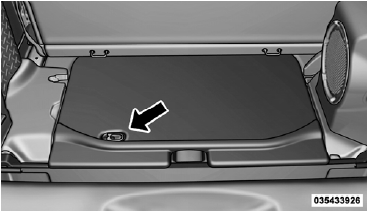
Rear Storage Cover
See also:
Add Names To Your Uconnect™ Phonebook
NOTE: Adding names to the Uconnect™ Phonebook is
recommended when the vehicle is not in motion.
• Press the button to begin.
• After the “Ready” prompt and the following beep, say
“ ...
Advanced Front Air Bag Features
The Advanced Front Air Bag system has multistage driver and front passenger air
bags. This system provides output appropriate to the severity and type of collision
as determined by the Occupant Re ...
Using The Touch-Screen Radio Controls
1. Press the MENU hard-key on the radio faceplate.
2. Touch the Rear VES soft-key to display the Rear VES
Controls. If a channel list is displayed, press the HIDE
LIST soft-key to display the Rea ...