


Instrument Panel Features
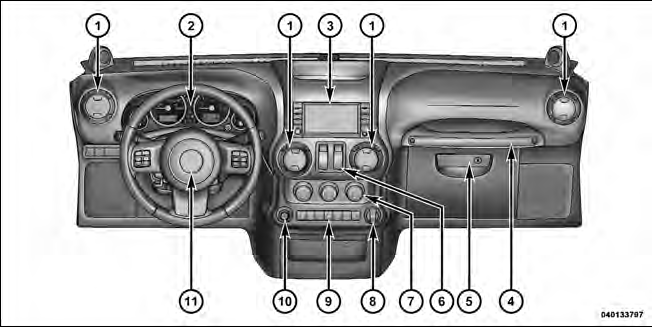 1 — Air Outlet
2 — Instrument Cluster
3 — Radio
4 — Assist Handle
5 — Glove Compartment
6 — Power Window Switches
7 — Climate Controls
8 — Power Outlet
9 — Lower Switch Bank
10 — Power Mirror Switch — If Equipped
11 — Horn
See also:
Uconnect™ Multimedia (Satellite Radio) — If Equipped
Satellite radio uses direct satellite-to-receiver broadcasting
technology to provide clear digital sound, coast to
coast. The subscription service provider is Sirius Satellite
Radio. This servic ...
Tip n’ Slide Seats — Two-Door Models
This feature allows the front seats to be rotated toward the instrument panel
to allow easier entry into the rear seats. ...
Redial
• Press the button to begin.
• After the “Ready” prompt and the following beep, say
“Redial”.
• The Uconnect™ Phone will call the last number that
was dialed from your mobile ph ...