


Compass Variance
Compass Variance is the difference between Magnetic North and Geographic North. To compensate for the differences, the variance should be set for the zone where the vehicle is driven, per the zone map. Once properly set, the compass will automatically compensate for the differences and provide the most accurate compass heading.
NOTE: Magnetic materials should be kept away from the top of the instrument panel; this is where the compass sensor is located.
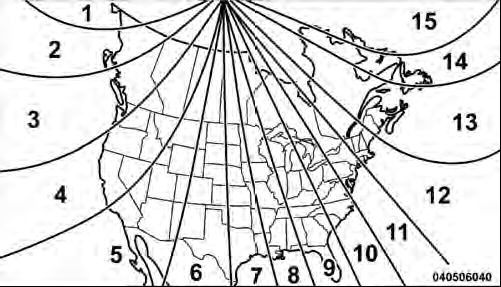
Compass Variance Map
To Change The Compass Variance:
1. Turn the ignition switch RUN (it is not necessary to start the engine).
2. Press the MENU button until Personal Settings (Customer-Programmable Features) displays in the EVIC.
3. Press the DOWN button until “Compass Variance” message and the last variance zone number displays in the EVIC.
4. Press and release the SELECT button until the proper variance zone is selected according to the map.
5. Press and release the COMPASS button to exit.
See also:
Fluid Capacities
...
Prepare For The Appointment
If you’re having warranty work done, be sure to have the right papers with you.
Take your warranty folder. All work to be performed may not be covered by the warranty.
Discuss additional charges ...
Battery Saver Feature
To protect the battery, the interior lights will turn off
automatically 10 minutes after the ignition switch is
moved to the LOCK position. This will occur if the
interior lights were switched o ...