


Media Center 130 (Sales Code RES)
NOTE: The radio sales code is located on the lower right side of the radio faceplate.
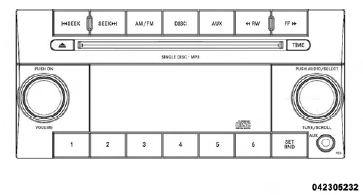
Media Center 130 (RES)
See also:
Vacation Storage
Anytime you store your vehicle, or keep it out of service (i.e., vacation) for
two weeks or more, run the air conditioning system at idle for about five minutes
in the fresh air and high blower se ...
Shifting
Shift Pattern
Fully press the clutch pedal before shifting gears. As you release the clutch
pedal, lightly press the accelerator pedal.
You should always use first gear when starting from a stan ...
CD/DVD Disc Maintenance
To keep a CD/DVD in good condition, take the following
precautions:
1. Handle the disc by its edge; avoid touching the
surface.
2. If the disc is stained, clean the surface with a soft cloth,
...