


Steering Wheel Audio Controls
The remote sound system controls are located on the rear surface of the steering wheel. Reach behind the wheel to access the switches.
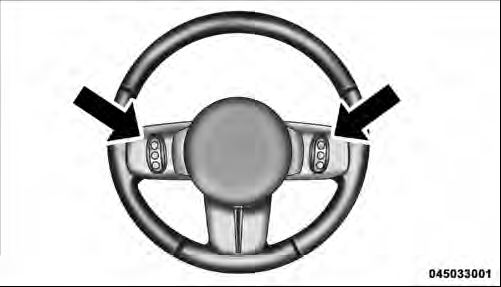
Remote Sound System Controls (Back View Of Steering Wheel)
The right-hand control is a rocker-type switch with a pushbutton in the center and controls the volume and mode of the sound system. Pressing the top of the rocker switch will increase the volume, and pressing the bottom of the rocker switch will decrease the volume.
Pressing the center button will make the radio switch between the various modes available (AM/FM/SAT/ CD/HDD/AUX/VES, etc.).
The left-hand control is a rocker-type switch with a pushbutton in the center. The function of the left-hand control is different depending on which mode you are in.
The following describes the left-hand control operation in each mode.
See also:
Engine Oil Filter
The engine oil filter should be replaced with a new filter
at every oil change.
Engine Oil Filter Selection
The manufacturer’s engines have a full-flow type disposable
oil filter. Use a filter ...
Park Assist System
The Rear Park Assist system will scan for objects behind
the vehicle when the transmission is in the REVERSE
position and the vehicle speed is less than 11 mph
(18 km/h). The system can be enabl ...
Towing Assistance
If you need towing assistance:
• Press the button to begin.
• After the “Ready” prompt and the following beep, say
“Towing Assistance”.
NOTE:
• The towing assistance number dia ...