


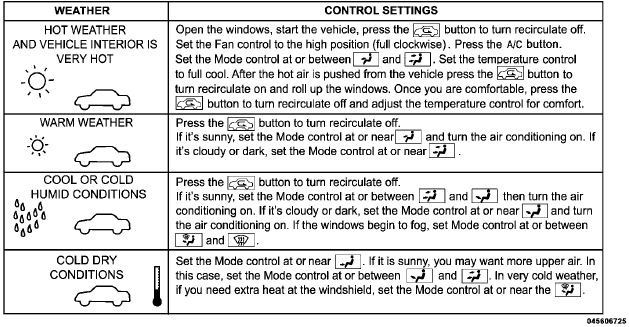
Control Setting Suggestions For Various Weather Conditions
Jeep Wrangler / Jeep Wrangler Owner's Manual / Understanding Your Instrument Panel / Climate Controls / Operating Tips / Control Setting Suggestions For Various Weather Conditions
See also:
Hazard Warning Flashers
The Hazard Warning flasher switch is located in the
switch bank below the climate controls.
Press the switch to turn on the Hazard Warning
flasher. When the switch is activated, all directional ...
Rear Tail, Stop, Turn Signal, And Backup Lamp
1. Remove the two inboard screws attaching the tail light housing to the body.
DO NOT REMOVE THE OUTER SCREWS AT ANY TIME.
2. Separate the housing from the body by pushing the lamp inboard while ...
Department Of Transportation Uniform Tire Quality Grades
the National Highway Traffic Safety Administration. The
specific grade rating assigned by the tire’s manufacturer
in each category is shown on the sidewall of the tires on
your vehicle.
All p ...