


Driver Memory Seat — If Equipped
This feature allows the driver to store up to two different memory profiles, for easy recall through a memory switch. Each memory profile contains desired position settings for the driver seat and side mirrors and a set of desired radio station presets.
The memory switch is located on the instrument panel to the left of the steering column. The switch contains a S (SET) button to activate the memory save function. It also contains a rocker switch labeled with the number (1) and the number (2). The rocker switch allows the driver to recall either of the two pre-programmed memory profiles by pressing the appropriate side of the switch.
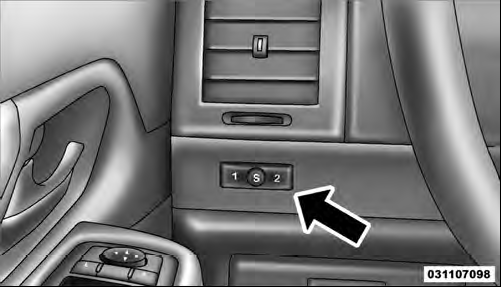
Driver Memory Switch
See also:
A Word About Your Keys
You can insert the double-sided keys into the locks with
either side up.
Vehicle Key
The authorized dealer that sold you your new vehicle has
the key code numbers for your vehicle locks. These ...
Making A Second Call While Current Call Is In Progress
To make a second call while you are currently on a call,
press the button and say “Dial” or
“Call” followed
by the phone number or phonebook entry you wish to
call. The first call wil ...
Security
It is advised to erase all channels before you sell or turn
in your vehicle.
To do this, press and hold the two outside buttons for
20 seconds until the red indicator flashes. Note that all
cha ...