


Media Center 230 (REQ) — AM/FM Stereo Radio And 6–Disc CD/DVD Changer (MP3/WMA AUX Jack)
NOTE: The radio sales code is located on the lower right side of the radio faceplate.
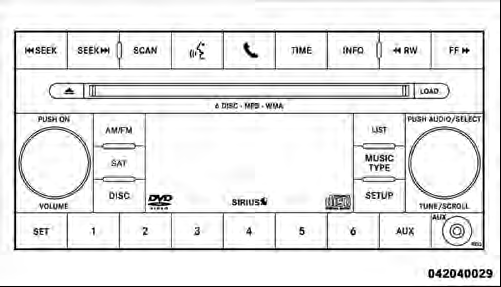
Media Center 230 (REQ)
See also:
Playback of MP3 Files
When a medium containing MP3 data is loaded, the radio checks all files on the
medium. If the medium contains a lot of folders or files, the radio will take more
time to start playing the MP3 file ...
Loading
The vehicle maximum load on the tire must not exceed
the load carrying capacity of the tire on your vehicle. You
will not exceed the tire’s load carrying capacity if you
adhere to the loading ...
To Activate
Push the ON/OFF button. The Cruise Indicator Light in
the instrument cluster will illuminate. To turn the system
off, push the ON/OFF button a second time. The Cruise
Indicator Light will turn o ...