


Driver’s Power Seat — If Equipped
The power seat switch is located on the outboard side of the seat near the floor. Use this switch to move the seat up or down, forward or rearward or to tilt the seat.
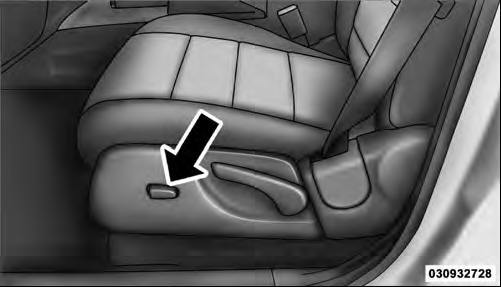
Power Seat Switch
Adjusting The Seat Forward Or Rearward
The seat can be adjusted both forward and rearward.
Push the seat switch forward or rearward, the seat will move in the direction of the switch. Release the switch when the desired position has been reached.
Adjusting The Seat Up Or Down
The height of the seats can be adjusted up or down. Pull upward or push downward on the seat switch, the seat will move in the direction of the switch. Release the switch when the desired position has been reached.
Tilting The Seat Up Or Down
The angle of the seat cushion can be adjusted in four directions. Pull upward or push downward on the front or rear of the seat switch, the front or rear of the seat cushion will move in the direction of the switch. Release the switch when the desired position has been reached.
Passenger Power Seat — If Equipped
Vehicle’s equipped with passenger power seats can only be adjusted forward and backward.
WARNING!
• Adjusting a seat while driving may be dangerous.
Moving a seat while driving could result in loss of control which could cause a collision and serious injury or death.
• Seats should be adjusted before fastening the seat belts and while the vehicle is parked. Serious injury or death could result from a poorly adjusted seat belt.
• Do not ride with the seatback reclined so that the shoulder belt is no longer resting against your chest. In a collision you could slide under the seat belt, which could result in serious injury or death.
CAUTION!
Do not place any article under a power seat or
impede its ability to move as it may cause damage to
the seat controls. Seat travel may become limited if
movement is stopped by an obstruction in the seat’s
path.
See also:
Under the Hood
All Compasses are powered by a 172-horsepower, 2.4-liter four-cylinder engine
equipped with variable valve timing for adequate pull at all engine speeds. It
powers the front wheels through a five- ...
Prepare For The Appointment
If you’re having warranty work done, be sure to have the
right papers with you. Take your warranty folder. All
work to be performed may not be covered by the
warranty. Discuss additional charg ...
Seats
Seats are part of the Occupant Restraint System of the vehicle.
WARNING!
• It is dangerous to ride in a cargo area, inside or outside of a vehicle. In a
collision, people riding in these areas a ...