


Turn Signals
Move the multifunction lever up or down and the arrows on each side of the instrument cluster flash to show proper operation of the front and rear turn signal lights.
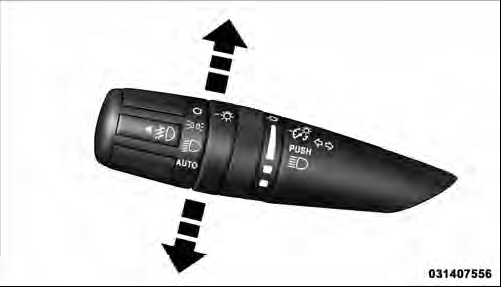
Turn Signal Control
NOTE: If either light remains on and does not flash, or there is a very fast flash rate, check for a defective outside light bulb. If an indicator fails to light when the lever is moved, it would suggest that the indicator bulb is defective.
Lane Change Assist
Tap the lever up or down once, without moving beyond the detent, and the turn signal (right or left) will flash three times then automatically turn off.
See also:
Illumin. Approach
When this feature is selected, the headlights will activate and remain on for
up to 90 seconds when the doors are unlocked with the RKE transmitter. To make your
selection, press and hold the SELE ...
Electronic Vehicle Information Center (EVIC) Displays
When the appropriate conditions exist, the EVIC displays the following messages:
• Low Tire Pressure
• Damaged Key
• Key in Ignition
• Turn Signal On (with a continuous warning chime)
• ...
CD Player
Pressing the top of the switch once will go to the next track on the CD. Pressing
the bottom of the switch once will go to the beginning of the current track, or
to the beginning of the previous t ...