


Compass Variance
Compass Variance is the difference between Magnetic North and Geographic North. To compensate for the differences, the variance should be set for the zone where the vehicle is driven, per the zone map. Once properly set, the compass will automatically compensate for the differences and provide the most accurate compass heading.
NOTE: Magnetic materials should be kept away from the top of the right rear quarter window. This is where the compass sensor is located.
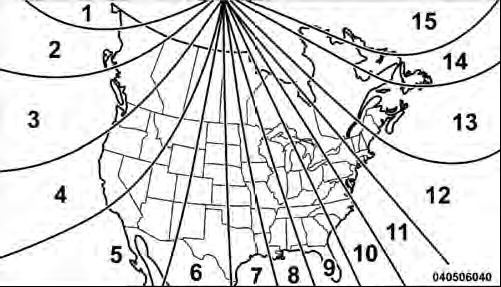
Compass Variance Map
To Change The Compass Variance:
1. Turn the ignition switch ON.
2. Press the MENU button until the Personal Settings (Customer-Programmable Features) menu displays in the EVIC.
3. Press the DOWN button until “Compass Variance” displays in the EVIC.
4. Press and release the SELECT button until the proper variance zone is selected according to the map.
NOTE: The Variance Values will wrap around from 15 back to 1. The Default Variance is Zone 8.
5. Press and release the COMPASS button to exit.
See also:
Answer Or Reject An- Incoming Call — Call Currently In Progress
If a call is currently in progress and you have another
incoming call, you will hear the same network tones for
call waiting that you normally hear when using your
mobile phone. Press the butto ...
Children Too Large For Booster Seats
Children who are large enough to wear the shoulder belt
comfortably, and whose legs are long enough to bend
over the front of the seat when their back is against the
seatback, should use the lap ...
Lap/Shoulder Belt Untwisting Procedure
Use the following procedure to untwist a twisted lap/ shoulder belt.
1. Position the latch plate as close as possible to the anchor point.
2. At about 6 to 12 in (15 to 30 cm) above the latch plate, ...